How to change filename case
Case: You want to change filenames to uppercase, lowercase, title case, or change only the first letter of each word.
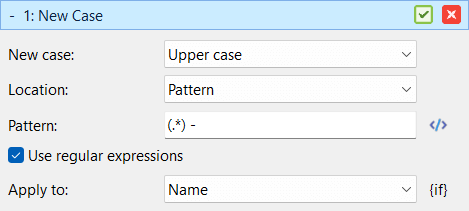
The New Case method can change the letter case of the filename without changing the words or file extension. Use it to make names consistent, easier to read, or better suited for a specific naming convention.
For example, summer holiday photo.jpg can be changed to Summer Holiday Photo.jpg or SUMMER HOLIDAY PHOTO.jpg.
Do the following:
- Add the files to the list.
- If there are methods in the method list, click the Clear Methods toolbar button.
- Add the New Case method.
- Choose the configuration that matches what you want:
- Uppercase filename: New case: Upper case, Location: All, Apply To: Name
- Lowercase filename: New case: Lower case, Location: All, Apply To: Name
- Title case filename: New case: Title case, Location: All, Apply To: Name
- Uppercase first letter of every word: New case: Upper case, Location: First letter of every word, Apply To: Name
- Verify the new names in the list and click Start Batch.
Use Apply To: Name when you want to keep the file extension unchanged. Use Apply To: Name and extension only if the extension should also be changed.